Kontrast Imager
Release · 1.0.0
Put width where it belongs.
Shape stereo width by frequency. Keep your lows centered, give upper layers room, and see how your left and right channels relate.
- Made for
- Windows x64 / VST3
- Your license
- Five personal computers
- Authorization
- Plugin + account browser
- Latest changes
- Read the updates ↗
Interactive stereo example
Hear the width.
Move the width control while a stereo synth phrase plays. At mono the trace becomes a vertical line. Widen the signal and the two sides spread apart.
A single-band browser example of mid/side width.
Inside Kontrast Imager
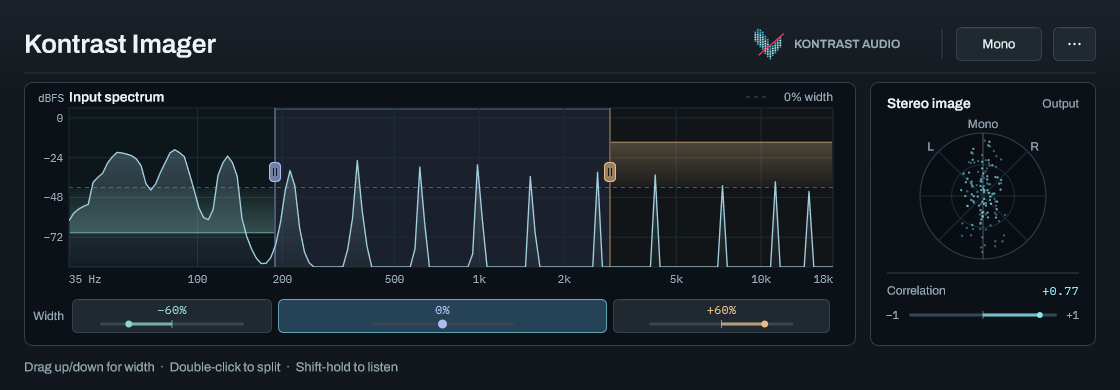
See the width you’re shaping.
Split the spectrum
Start with one full-range band. Double-click the spectrum to add crossovers and create up to eight independent bands, then drag a crossover to tune its frequency.
Shape the sides
Drag up to widen or down to narrow. Each band’s fill shows the width adjustment above or below the 0% line. At −100% the band is mono. At +100% its side signal doubles.
Check what comes out
Listen to a band in isolation with Shift-hold, or switch the output to mono. The live vectorscope and correlation meter show the processed stereo image.
Keep your starting points
Type exact crossover frequencies and width percentages. Compare settings with A/B, save preset files, or recall your setup with the DAW project.
Before you buy
Know your instrument.
Kontrast Imager 1.0.0 combines flexible multiband width editing, persistent band fills on the spectrum, and live stereo output monitoring.
Ask us about Kontrast Imager ↗- Platform / format
- Windows x64 · VST3
- Version
- 1.0.0 Release
- License
- One-time purchase · personal license · commercial use included · five computers
- Authorization
- Click Authorize in the plugin and approve its matching code in your account browser.
- Connection
- Online authorization and a brief automatic license check about once a month.
- Offline use
- Works offline between checks. If authorization expires, the effect passes audio through unchanged until it can authorize again.
- Installation
- Unsigned Windows VST3 bundle. Copy the complete folder into your DAW’s VST3 location.
- Update history
- Follow Kontrast Imager updates
Kontrast Imager
Put width where it belongs.
Windows x64 VST3 · 1.0.0 · Release